EMEET C950 vs C960: One Face at 70 Degrees or Two at 90
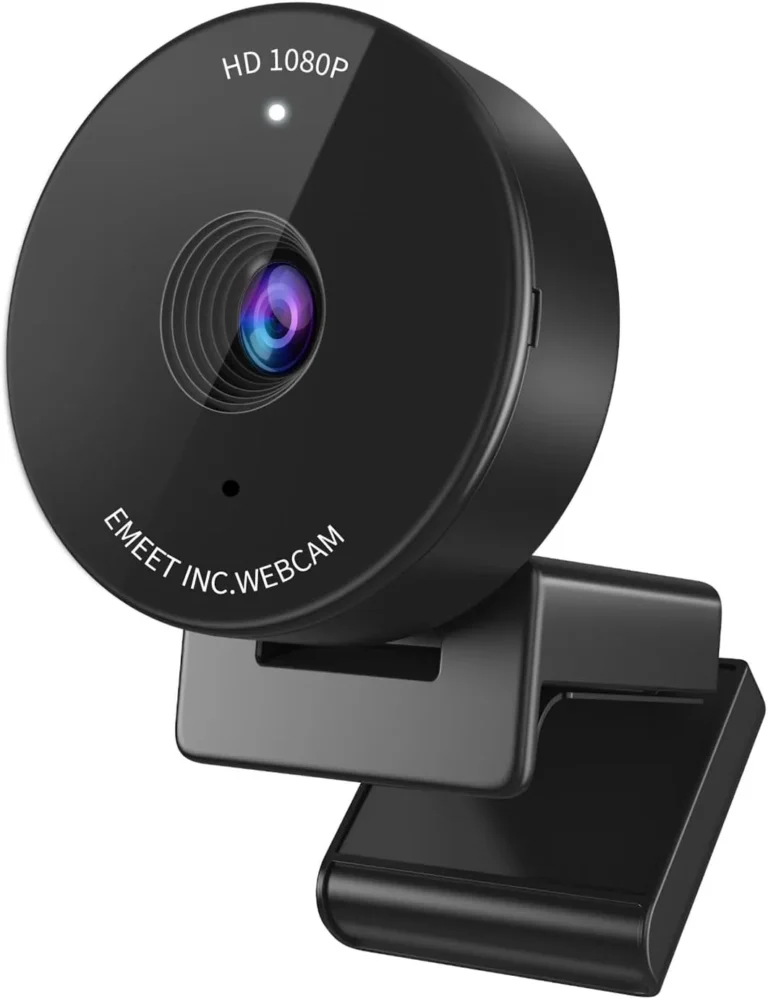
EMEET C950 1080P Webcam
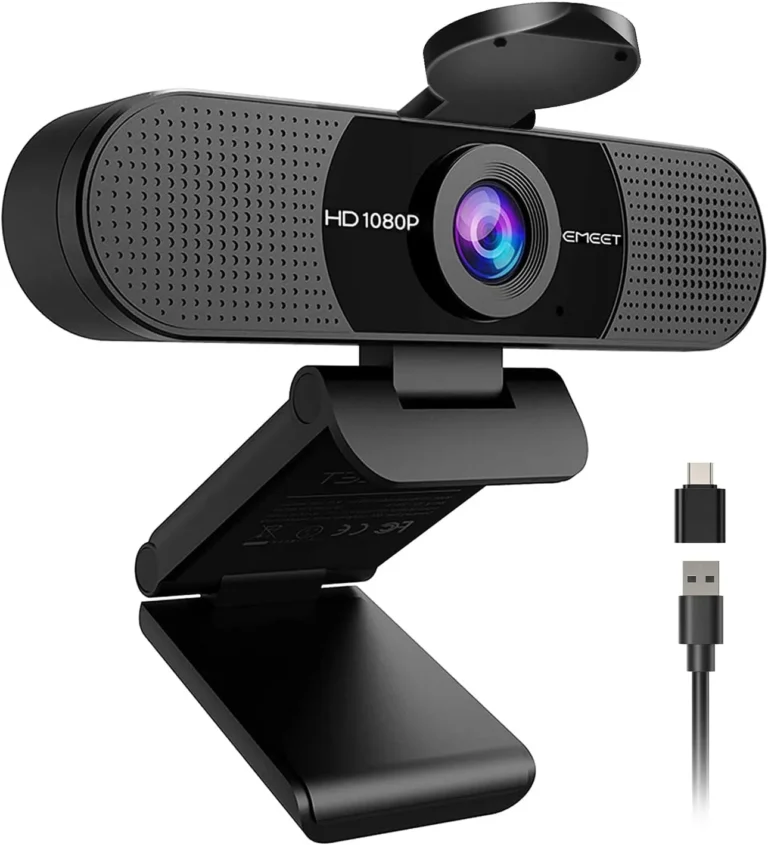
EMEET C960 1080P Webcam (2025 Version)
The C950 frames one face at 70 degrees and hears it through one mic, while the C960 opens to 90 degrees and listens through two. Beyond that split, the specifications sit close together. Both cameras shoot 1080p at 30 fps from a 1/2.7-inch, 2 MP sensor behind a fixed-focus lens. Both also plug in over USB-A and run without a driver.
The room behind the caller decides the EMEET C950 vs C960 choice more than the picture does. A tight crop shows little of that space, which is the C950's main appeal. A wide frame, which the maker says captures more participants, fits a second chair instead. For one voice in a quiet room, either camera can still stand in for a headset mic on everyday calls.
Each width carries a cost, though. At 90 degrees, a solo call still shows a wide slice of the room, so turning on background blur makes sense. At 70 degrees, the frame centers on one seat, which leaves a shared call to the C960. Meanwhile, the C960 adds a tripod thread plus, in its 2025 box, a USB-C adapter, and its clip grips firmly where the C950's grips loosely. The C950 counters with less weight and a lower price.
The C960 suits a desk that sometimes seats two, while the C950 suits one person who would rather the room stayed off camera.
How They Compare
| Category | Winner | Why |
|---|---|---|
| Resolution | Tie | Resolution is identical on paper, since the C950 and the C960 both output 1080p, which the C960's spec sheet spells out as 1920 by 1080. The finish differs, though. Under good light, the C950 gives a clear, consistent picture for work calls, school and interviews. Still, it isn't the crispest, and its default settings can wash skin out until EMEETLINK's sliders correct it. Under good indoor light, the C960 renders a clear, sharp image with natural color, although some of its units produce a softer, grainier picture than the rest. Neither review measures one picture against the other, and both output the same 1080p, so resolution ends level. |
| Frame rate | Tie | Frame rate gives neither camera an edge, because the C950 and the C960 both run at 30 fps. On the C950 that figure is the ceiling, and the maker gives the C960 the same 30 fps at 1080p. At that rate, the C950's motion stays smooth, and the camera can carry a first stream as well as a call. The C960's picture likewise suits casual streams and recorded clips, with YouTube among the apps its maker names. Neither, however, suits a streamer who needs 60 fps motion, so the ceiling limits both equally. With the same rate and the same limit, the two are level on this one. |
| Field of view | EMEET C960 1080P Webcam (2025 Version) | Field of view splits the pair at 70 degrees on the diagonal for the C950 and 90 for the C960. From a monitor's top edge, the C950's crop sits close, with little of the room getting in, and its maker sells that narrowness as privacy. The C960's frame, meanwhile, takes in the speaker and much of the room behind, so background blur is worth turning on for a solo call. The maker's account of its controls also mentions no zoom or framing setting to narrow the view. Still, the maker says the 90-degree width captures more participants. Because the C960's frame fits a second chair, while the C950's centers on one seat, the C960 takes this. |
| Focus | Tie | Focus stays fixed on both, with no autofocus to follow a face and no manual focus to set. For the C950, the maker gives an ideal distance of 0.5 to 1.2 meters, with the clearest image at 80 to 100 cm. The seat therefore does the focusing, and the maker's advice is to sit inside that range, facing the lens. For the C960, the maker instead rates the fixed focus from 30 to 300 cm, about one foot out to ten. A face at a normal desk distance sits well inside that span, though a page held within a foot sits nearer than it. The maker states an ideal distance for one and a focus range for the other, so those figures do not rank the pair. On focus, the two are level. |
| Sensor | Tie | Sensor specs match, with a 1/2.7-inch CMOS at 2 MP in both the C950 and the C960, per the maker's sheets. Exposure, white balance and backlight compensation also run automatically on each. The C950's listing adds low-light correction, while the maker says the C960's light correction adjusts to the room and reduces flicker. Both still ask for good light, on the maker's own advice. In a dim room the C950's picture turns dark and murky, past what its correction can lift, and a well-lit room is the maker's first instruction. The C960's listing likewise advises a normal or well-lit room twice over, even though a face stays distinct in merely average light. With matching sensor specs and similar lighting advice, the two are level here. |
| Microphones | EMEET C960 1080P Webcam (2025 Version) | Microphones differ in count and in reach. On the C950, a single omnidirectional mic does the work, and the maker rates it best at 1 to 1.8 meters in a quiet room. The maker also quotes a frequency range of 100 Hz to 10 kHz for it. That mic carries a voice clearly enough for meetings and lessons, so everyday calls can skip the headset. Its sound is plain and short on detail, though. The C960, meanwhile, has two omnidirectional mics, and the maker rates their optimal pickup at 2.4 meters. At desk distance they pick up a voice cleanly, and a second speaker a few feet back also stays inside that range. Two mics and the longer rated pickup therefore make the C960 the stronger choice here. |
#2 EMEET C950 1080P Webcam (7.6/10)
The C950 is the narrower, lighter and cheaper of the two. Its 70-degree crop is built around one face, with one omnidirectional mic and a sliding lens cover, for a solo caller whose room should stay off the screen.
Strengths
- Narrow 70-degree view frames one face and leaves much of the room off the screen
- Small and light at 75.9 grams, easy to carry in a laptop bag
- Clear, consistent 1080p picture in a bright room for calls, classes and interviews
- Plug-and-play over USB-A with no driver, plus a sliding cover that blocks the lens when idle
Weaknesses
- The single mic sounds plain, so recorded work needs a separate microphone
- The clip grips loosely, the cable can tug it out of line, and there is no tripod thread
- Some units arrive dead, and others develop picture or mic faults
Review verdict: A narrow 70-degree view keeps a home office off camera, and with good light on the face the EMEET C950's 1080p picture is clear enough for daily work calls.
- Narrow 70-degree view frames one face and leaves much of the room off the screen
- Clear, consistent 1080p picture in a bright room for calls, classes and interviews
- Plug-and-play over USB-A, with no driver and no app needed for a call
- Stick-on sliding cover blocks the lens whenever the camera isn't in use
- EMEETLINK sliders correct pale skin tones and add an anti-flicker setting
- The clip grips loosely, and the cable can tug the light body out of line
- The picture turns dark and murky in a dim room
- Fixed focus with no autofocus, a 30 fps ceiling and no tripod thread
- The single mic sounds plain, so recorded work needs a separate microphone
- Reliability varies: a few units arrive dead, and others develop picture or mic faults
#1 EMEET C960 1080P Webcam (2025 Version) (7.9/10)
The C960 is the wider of the two. It opens the same 1080p at 30 fps to 90 degrees, with two omnidirectional mics, a tripod thread and a USB-C adapter in the 2025 box, for a desk that seats two now and then.
Strengths
- Two omnidirectional mics pick up a voice cleanly at desk distance
- Wide 90-degree view takes in a broad stretch of the room
- Clear, sharp 1080p with natural color under good indoor light
- Clip grips a monitor's top edge firmly, and it needs no driver on Windows or macOS
Weaknesses
- The 90-degree view shows much of the room behind a solo caller
- The bundled USB-C adapter fits loosely in some ports, so a nudge can cut the feed
- Some units are dead on arrival or quit within weeks, and the stick-on cover can arrive broken or come loose
Review verdict: Plug in the EMEET C960 and a call gets clear 1080p in a 90-degree frame, plus two mics good enough to leave the headset off for everyday meetings.
- Needs no driver on Windows or macOS: plug it in and choose it in the call app
- Two omnidirectional mics pick up a voice cleanly at desk distance
- Clear, sharp 1080p with natural color under good indoor light
- Wide 90-degree view takes in a broad stretch of the room
- Flip-down privacy cover over the lens, plus a blue in-use light
- The bundled USB-C adapter fits loosely in some ports, so a nudge can cut the feed
- Some units are dead on arrival or quit within weeks, and the stick-on cover can arrive broken or come loose
- The 90-degree view shows much of the room behind a solo caller
- Some units produce a soft, grainy picture, while EMEET itself advises a well-lit room
EMEET C950 vs C960: narrow with one mic, or wide with two?
The C950 aims at one person in a room that should stay private. Its 70-degree crop keeps a bedroom office, a shared apartment or a corner of the living room largely off the screen. For its single mic, the maker recommends a quiet room and 1 to 1.8 meters to the speaker. On those terms, one voice comes through clearly enough for a meeting or a lesson.
The C960 aims wider on both counts. Its 90-degree frame holds the speaker plus a wide strip of the room, and the maker rates the best pickup of its two mics at 2.4 meters. That suits a desk shared by two or a small room with several chairs in view. On a solo call, though, the same width leaves much of the background visible.
Both cameras sit in the budget tier, the price band for entry-level webcams, and they share the basics, from 1080p at 30 fps to a stick-on lens cover. Neither mixes the two packages, however, so a narrow frame with a second mic is not on offer from this pair. A private room with one caller therefore points to the C950's crop, while two chairs at one desk point to the C960's width and second mic.
The C960 adds hardware while the C950 saves weight
Mounting is where the additional hardware appears first. A 1/4-inch tripod thread sits under the C960, and its clip grips a monitor's top edge firmly through a call, though some screens take more fiddling. The C950's spec table, in contrast, marks the tripod thread N/A, and its clip holds by balance more than grip. At 75.9 grams, that camera is light enough for its own cable to tug it out of line. The maker advises a slack cable and a clip lying flat on the monitor.
Connections follow the same pattern. Both cameras end in a USB-A plug on a USB 2.0 link, and the 2025 C960 box adds a USB-C adapter for laptops without a USB-A socket. That adapter fits loosely in some ports, however, so a nudge can cut the feed mid-call. For the C950, a USB-C-only laptop needs an adapter or a hub.
The C950 keeps its own edge in weight and price. It weighs 75.9 grams against the C960's 125 and slips into a laptop bag, while its lower price also makes it a sensible spare for a second desk. For one person who wants the room hidden, those savings suit the brief. Once a second voice joins the call, though, the C960's hardware earns its higher price.
Conclusion
Everyday calls from a home desk, especially one that sometimes seats a second person, go to the C960. At desk distance its two mics catch a voice cleanly, and a second voice a little farther back still falls inside the maker's rated pickup range. Its 90-degree frame also makes room for that extra face. Meanwhile, its clip grips the monitor firmly, a tripod thread sits underneath, and a USB-C adapter comes in the 2025 box. It also carries the higher score, 7.9 to the C950's 7.6.
The C950 is the right call for a solo caller who would rather keep a private room out of the shot. Its 70-degree crop leaves little of the space behind the chair in view. It is also the lighter and cheaper of the two. That lower price suits a student or tutor who needs a clear camera for online classes. In return, it brings a plain-sounding single mic, a clip that grips loosely and no tripod thread.
Unless the room behind a solo caller must stay off camera, the second mic and the wider frame settle the EMEET C950 vs C960 question in the C960's favor.
Frequently Asked Questions
Will the C950 or the C960 work with a USB-C-only laptop?
Yes, through an adapter in either case. The C960's 2025 listing includes a USB-A to USB-C adapter. However, the maker's own C960 product page still shows a box without one, so check that the listing names the 2025 version. For the C960, the maker also advises the computer's main port over a hub. The C950's USB-A plug, meanwhile, reaches a USB-C-only laptop through an adapter or a USB hub.
Can the C950 or the C960 mount on a tripod?
Only the C960 can. Its 1/4-inch thread sits underneath, and the maker describes an adjustable 180-degree base and a 90-degree head that also let it sit flat on a desk. The C950's spec table lists the tripod thread as N/A, so it rides on its monitor clip or sits on a desk or monitor stand instead. On monitors where its clip won't hold, double-sided tape keeps the C950 in position.
Do the C950 and the C960 need software to work?
No. Both run without a driver or an app once the call app has the camera selected. EMEETLINK, the maker's optional app, adjusts brightness, contrast, sharpness, saturation and white balance on each, and it sets anti-flicker as well. For the C950, however, it needs 64-bit Windows 10 or macOS 10.14 at minimum, and Windows laptops with ARM chips can't run it. For the C960, the maker's pages also offer it for Windows and macOS.
How do the privacy covers on the C950 and the C960 differ?
The C950 uses a stick-on slider: line it up over the lens, press it on firmly for a few seconds, then slide it left or right. A stick-on cover on the C960 flips down over the lens instead and lifts clear for a call. The C960 also has a blue in-use light that glows while an app is using the camera. Both covers ship loose in the box, so check the packaging before throwing it away.
Do the C950 and the C960 both work on a Mac?
Yes. The maker lists macOS 10.14 or later for both, and neither needs a driver. On a Mac, the C950 goes in as the default input under Sound, then gets picked as the camera in each app. With the C960, the Mac asks for camera and microphone permission first, and its input choice sits under Sound, then Input. On some computers, the C960 shows no picture until the call app has it selected as the camera.