A computer microphone is the rare upgrade that improves every call, stream, and recording you make, yet the category is a minefield of inflated scores and interchangeable marketing copy. Search results are crowded with unknown brands posting suspiciously perfect numbers, and every product page promises studio quality. We took a different route: we synthesized what large pools of verified Amazon owners actually report — the praise that repeats, the complaints that repeat harder — and weighed it against official spec sheets rather than press releases.
The seven picks below span the whole map, from streaming desks to meeting rooms: a multi-pattern USB all-rounder, a flagship XLR kit for people who have outgrown USB, a compact single-voice mic, a conference unit built for meetings, and a budget gooseneck that keeps its dignity. Not every high score made the cut, and the copy below says so plainly. Where a pick sits below a higher-scored product, we explain why. Where a brand earned its slot on track record rather than a headline number, we say that too. The goal is a list you can act on, not a leaderboard.
Our Top Picks
Compare all 7 picks
| Spec | #1 Logitech Blue Yeti X | #2 HyperX QuadCast | #3 SteelSeries Alias Pro XLR Microphone Kit | #4 HyperX SoloCast USB Condenser Gaming Microphone | #5 ZealSound K66 USB Microphone | #6 TONOR Conference USB Microphone | #7 Fifine K054 USB Computer Microphone |
|---|---|---|---|---|---|---|---|
| Score | 9.4 | 9.2 | 9.6 | 9 | 9 | 9 | 9 |
| Form factor | USB | USB, Condenser | XLR | USB, Condenser | USB | USB, Condenser | USB, Gooseneck |
| Platform / ecosystem | Mac, Windows / PC | Mac, Windows / PC, PlayStation 5 | Windows / PC | Mac, Windows / PC, PlayStation 5 | Windows / PC, PlayStation 5 | Mac, Windows / PC | Mac, Windows / PC |
| Specific feature | — | LED lights | LED lights | — | Cardioid, Mute button | Omnidirectional | Mute button |
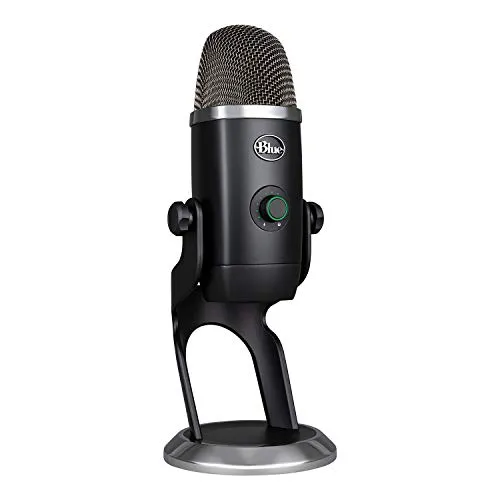
Logitech Blue Yeti X Top Pick
The category's true all-rounder — four pickup patterns, live metering, and controls verified owners call intuitive.
The Logitech Blue Yeti X USB Microphone is an exceptional tool for any digital content creator.
Pros: What we liked
- Pro: Exceptional audio clarity
- Pro: Versatile recording patterns
- Pro: Intuitive user interface
Cons: What could be better
- Con: Bulky size compared to some alternatives
- Con: Requires external pop filter for best results
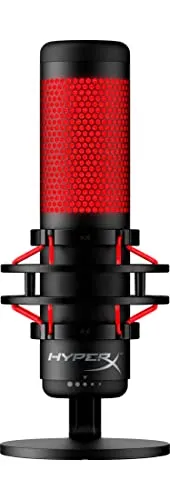
HyperX QuadCast Runner Up
Four patterns, tap-to-mute, and an anti-vibration mount — the top pick's closest rival on pure merit.
In summary, the HyperX QuadCast is an exceptional USB condenser gaming microphone that stands out for its sound quality, versatility, and user-friendly features.
Pros: What we liked
- Pro: Versatile polar patterns
- Pro: Robust build quality
- Pro: Intuitive design and features
Cons: What could be better
- Con: No XLR output
- Con: LED might be distracting
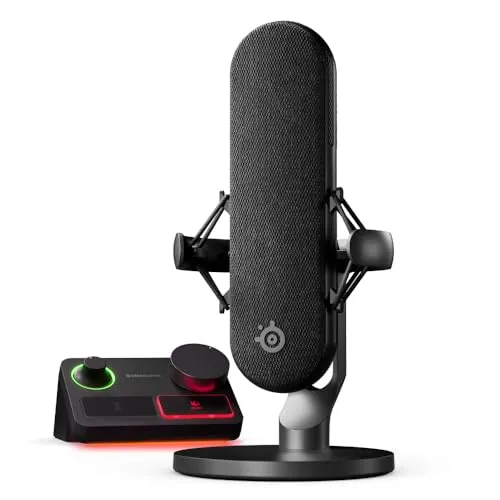
SteelSeries Alias Pro XLR Microphone Kit XLR Upgrade Pick
Tied for the category's highest score — a flagship-tier XLR kit for people who already know why.
The SteelSeries Alias Pro is not merely an addition to your gaming or streaming setup; it's a comprehensive upgrade that enhances every aspect of your audio production.
Pros: What we liked
- Pro: Broadcast-quality audio with pro-grade XLR connection
- Pro: Wide range of vocal capture with 3x bigger capsule
- Pro: Simplified streaming setup with EZ Dual PC connectivity
Cons: What could be better
- Con: Requires a separate boom arm for optimal positioning
- Con: Learning curve for utilizing all software features effectively
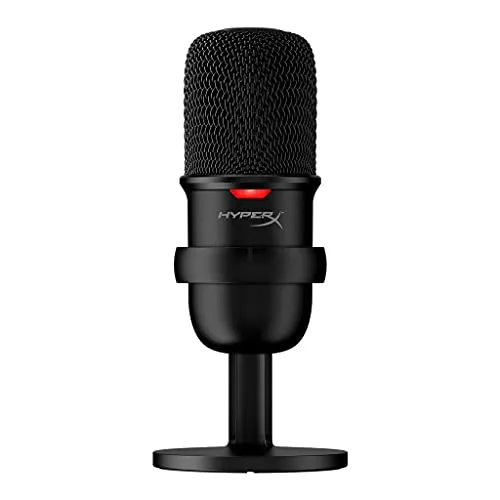
HyperX SoloCast USB Condenser Gaming Microphone Compact Pick
One cardioid pattern, zero frills — the minimalist answer when the QuadCast is more microphone than needed.
The HyperX SoloCast USB Condenser Gaming Microphone is a stellar example of a product that strikes a perfect balance between functionality, quality, and affordability.
Pros: What we liked
- Pro: Plug-and-play ease
- Pro: Compact and sleek design
- Pro: Durable build quality
Cons: What could be better
- Con: Single polar pattern
- Con: No onboard gain control
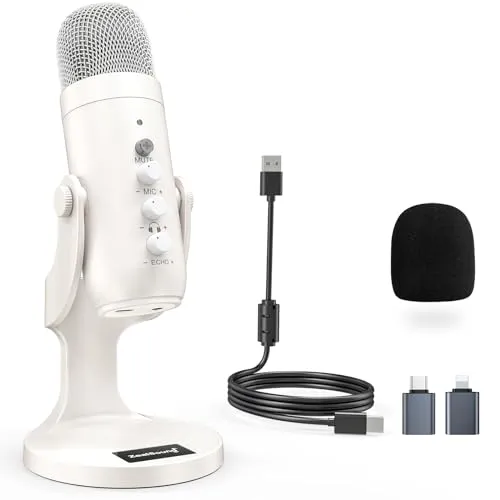
ZealSound K66 USB Microphone Onboard Controls Pick
Gain, echo, and live monitoring on the mic itself — controls pricier rivals leave to software.
In conclusion, the ZealSound K66 USB Microphone is a standout choice for creators seeking a high-quality, versatile microphone.
Pros: What we liked
- Pro: Precise mic gain and echo adjustment
- Pro: Real-time audio monitoring
- Pro: Plug-and-play compatibility with multiple devices
Cons: What could be better
- Con: Echo function adjustment learning curve
- Con: Heavier base may not suit all setups
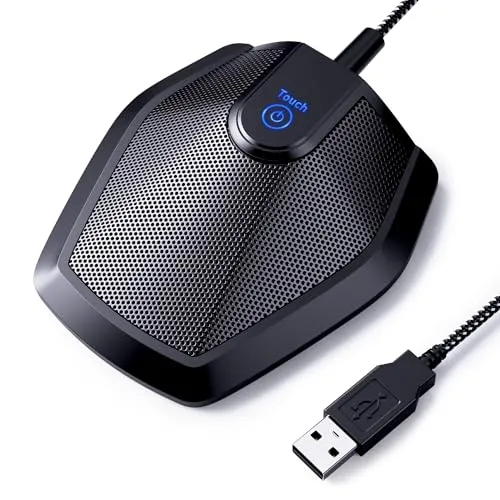
TONOR Conference USB Microphone Conference Pick
Built for calls, not content — a budget-tier desk mic that picks up the whole conversation.
The TONOR Conference USB Microphone is a stellar choice for anyone in need of a reliable, high-quality audio solution for their computer or laptop.
Pros: What we liked
- Pro: Easy plug-and-play setup
- Pro: Broad compatibility with OS and software
- Pro: High-quality audio capture
Cons: What could be better
- Con: No onboard mute or volume controls
- Con: Non-detachable USB cable
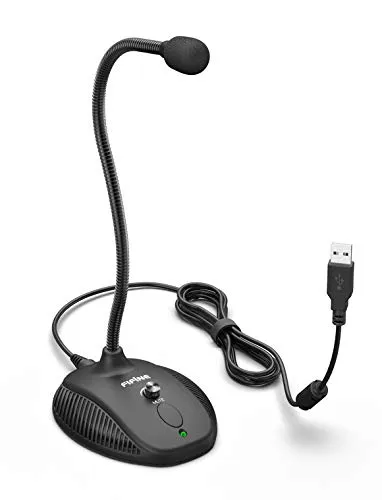
Fifine K054 USB Computer Microphone Budget Pick
A volume knob and mute button where cheaper rivals give nothing — the budget slot, earned.
In summary, the Fifine USB Computer Microphone (K054) is a well-rounded audio device that combines smooth recording, ease of use, ergonomic design, and durability.
Pros: What we liked
- Pro: User-friendly controls with volume knob and mute button
- Pro: Flexible gooseneck design for optimal positioning
- Pro: Plug & Play convenience for easy setup
Cons: What could be better
- Con: Non-detachable USB cable may limit mobility
- Con: Limited polar pattern options for different recording scenarios
Buying Guide
Start with the job, not the spec sheet. One voice at one desk needs a single cardioid pattern — the SoloCast and K054 cover that completely. Multi-pattern microphones like the Yeti X earn their bulk only if you actually record interviews, roundtables, or room audio. Most owners of multi-pattern mics end up living in cardioid mode anyway.
Decide USB or XLR before anything else. USB is plug-and-play and covers almost everyone. XLR delivers headroom and an upgrade path, but it demands more gear and patience — a boom arm at minimum — and the Alias Pro is a commitment, not a convenience. If you are asking whether you need XLR, you do not yet.
Weigh onboard controls above marginal audio claims. A gain knob, a mute button, and real-time monitoring change daily use far more than a claimed frequency range. Mics without them leave you with the same regret: reaching for software mid-call.
Separate meetings from content. Conference mics like the TONOR use wide pickup to capture a conversation around a desk — exactly what you do not want for streaming or voiceover, where a tight cardioid rejects the keyboard and the room.
Finally, at budget tiers, buy the brand with a track record. A no-name mic with a perfect score is a worse bet than a FIFINE or TONOR with honest cons. Honest cons tell you which is which; the badge on the box does not.
Why the Top Pick Isn't the Highest Score
The SteelSeries Alias Pro carries a 9.6 — tied for the highest number in the category — and it sits third. That is deliberate. Scores in this category compress toward the top: dozens of microphones cluster between 9.0 and 9.6, several of them from brands with one product, a wall of praise, and no track record. A number that high is only meaningful when the substance underneath survives scrutiny. So the ranking weighs what the score cannot: how many people a pick actually serves, whether the brand's other reviews hold up, and whether the flaws owners report are ordinary or disqualifying. The Yeti X leads at 9.4 because it is the pick we would hand to the most people with the fewest caveats. The 9.6 is real. It is also not the point.
The Near Misses
The Blue Snowball iCE is a household name we left off to avoid a second Logitech beside the Yeti X — the same doubling rule that benched the SteelSeries Alias USB, also a 9.6, behind its Pro sibling. HyperX gets the only exemption because the QuadCast and SoloCast serve opposite ends of the price range. TKGOU's conference mic outscores the TONOR but has the thinner track record, and its own review concedes limited brand recognition. Movo's LV1-USB lavalier is credible and misses only because this page has no lavalier slot yet. A cluster of unknown brands — RayBit, Oriveegyo, WMT, CMTECK, NJSJ, BBeiyy — post big numbers their review substance does not support. And AUDIOPRO's listing needs a data fix first: its review text describes earbuds, not a microphone.
Related Articles
Conclusion
Seven picks, one rule: every slot has to survive scrutiny. The Yeti X leads because its strengths are verifiable and its flaws are ordinary. The Alias Pro carries a score tied for the category's highest and still sits third, because most people do not need that much microphone. The rest of the list trades headroom for fit — compact, conference, controls, budget — and every con we print is a real one, not a line lifted from a competitor's marketing.
This page is maintained, not archived. As new microphones accumulate enough verified-owner feedback to be judged fairly, we re-run the analysis and re-rank. Picks that slip — a discontinued model, a drift in owner sentiment — get replaced, and the near-miss list is the first place we look. Check back before you buy; the date in the title is a promise.
Frequently Asked Questions
Are USB microphones good enough for streaming and podcasting?
Yes, for nearly everyone. The Yeti X and QuadCast deliver clear audio and intuitive controls out of the box. XLR buys headroom and an upgrade path, not a magic jump in quality — and it adds gear, desk space, and a learning curve most streamers never miss.
Do I need a multi-pattern microphone?
Only if you record more than one voice at one desk. Cardioid handles solo streaming, calls, and voiceover. Omnidirectional and bidirectional patterns matter for interviews, roundtables, and room capture. Most owners of multi-pattern mics settle into cardioid and stay there, so treat extra patterns as an option, not a requirement.
Why does a 9.6-scored microphone rank below a 9.4?
Because a score is one input, not the verdict. We weigh brand track record, review substance, and fit alongside the number. The Alias Pro's 9.6 is real, but it is a flagship commitment most people do not need; the Yeti X serves more people with fewer caveats. The copy owns every such call.
Do I need a pop filter with these microphones?
For close-talking condenser mics, usually yes. The Yeti X and ZealSound K66 in particular need one for clean plosives, and several picks list it as a worthwhile extra. Gooseneck and conference mics used at speaking distance need it less. If you record close to the capsule, plan on one.
What is the difference between a conference microphone and a streaming microphone?
Pickup pattern and purpose. Conference microphones like the TONOR use wide pickup to catch several voices around a desk, which also means they catch keyboards and room noise. Streaming mics use a tight cardioid to isolate one voice. Buy for the actual job; neither type does the other's work well.
Are budget microphones from unknown brands worth buying?
Sometimes — but be picky. This category is crowded with unknown brands posting suspiciously high scores on thin review substance. We ranked the FIFINE K054 and TONOR because they hold up to real appraisal, cons included. A known budget brand with honest flaws beats a perfect-scoring mystery brand every time.