Insta360 Link 2 vs Link 2 Pro: Same Gimbal, Bigger Sensor, Two Mics
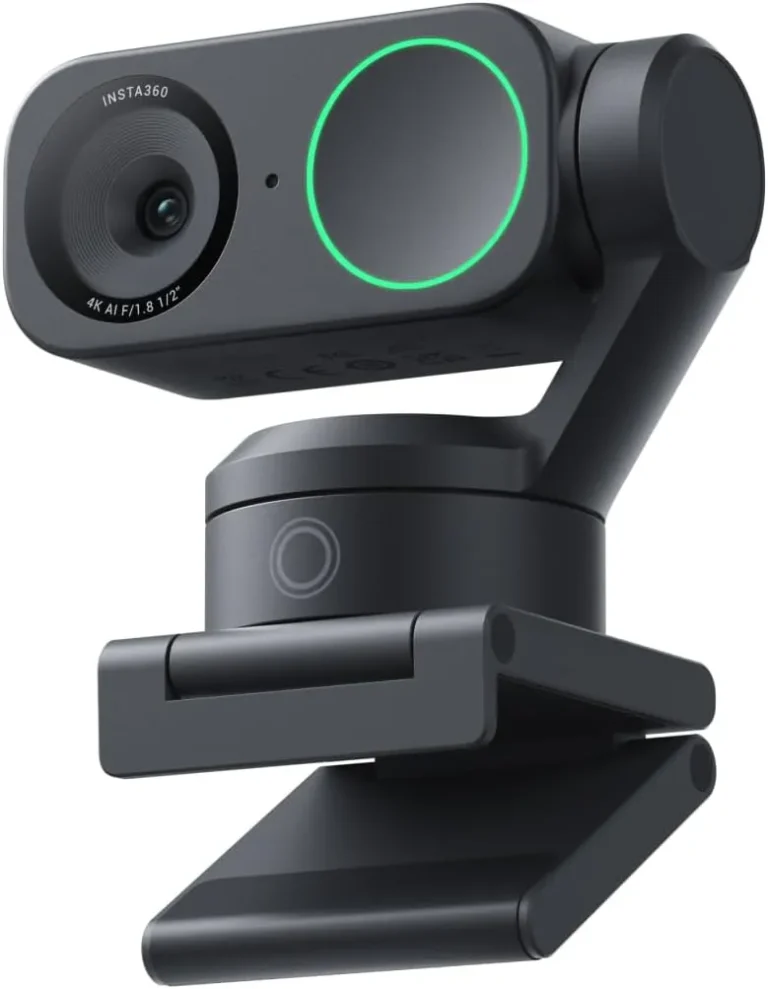
Insta360 Link 2 4K PTZ Webcam
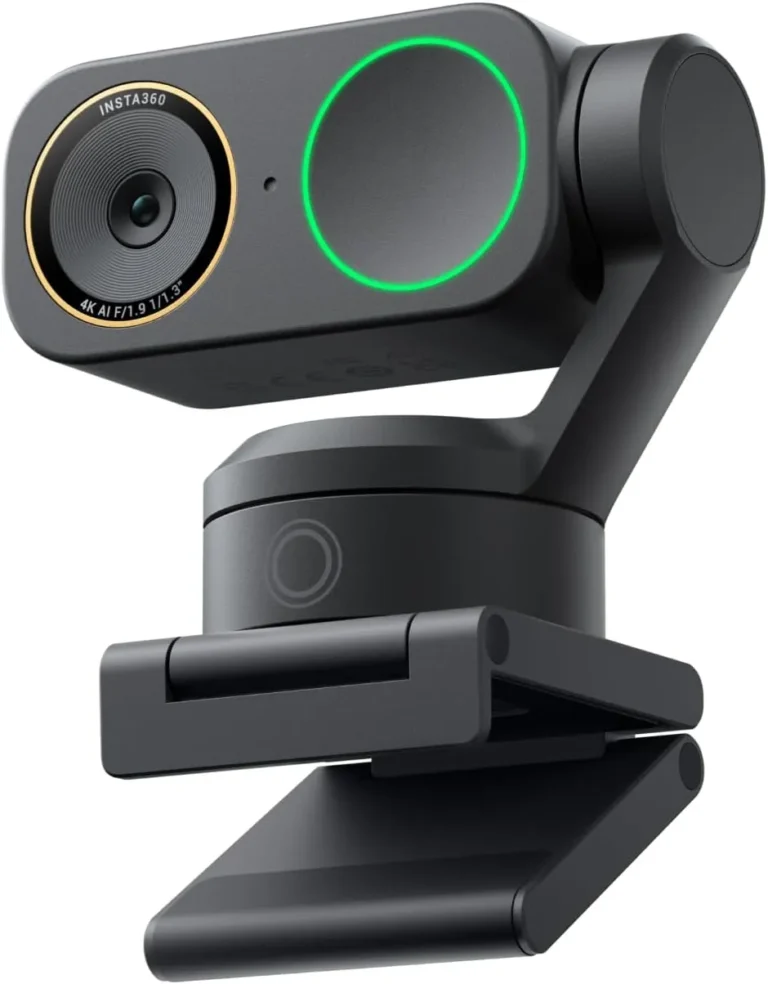
Insta360 Link 2 Pro 4K PTZ Webcam
A larger sensor and a second, directional microphone are the main gaps between the Link 2 Pro and the Link 2. The Pro's 1/1.3-inch chip adds Dual Native ISO, while the Link 2 uses a 1/2-inch sensor. The Pro also pairs its directional mic with an omnidirectional one. That brings four pickup modes against three on the Link 2, and the Pro's view runs a few degrees wider.
Much of the rest of the Insta360 Link 2 vs Link 2 Pro spec sheet lines up. Both cameras use the same two-axis gimbal design, follow a moving speaker with AI tracking and focus by phase detection. They also share 4K at up to 30 fps, 1080p at up to 60 fps and the Link Controller app.
The maker aims the Pro's upgrades at rooms that are dim or noisy, and both deliver: even an office with poor light gives a clear, detailed face, and speech comes through clearly on calls. Against that, the Link 2 holds the higher score and sits a price tier lower, and its color is natural where the Pro's trails its detail in some rooms.
The Link 2 suits a moving presenter in a well-lit, quiet space, while the Link 2 Pro suits a dim study or a desk with other voices nearby.
How They Compare
| Category | Winner | Why |
|---|---|---|
| Resolution | Tie | Resolution is identical on both cameras. The Link 2 and the Link 2 Pro each record 4K UHD and step down to 1080p, 720p and 360p modes. Both also carry that 4K feed over USB-C at USB 2.0 speed. Insta360 credits each with HDR and a digital zoom of up to 4x as well. Each review found the 4K picture sharp, even in a dim room. One default on the Pro still calls for a visit to the app, though. The maker sets its sharpening high, so a face can look over-processed until the Sharpness slider in Link Controller comes down. Since the modes and the 4K ceiling match, the two are level on resolution. |
| Frame rate | Tie | Frame rate gives the two cameras identical numbers. The Link 2 and the Link 2 Pro both cap 4K at 30 fps, and both run 1080p and 720p at up to 60 fps. They also share one catch. Insta360 routes Natural Bokeh, background blur and replaced backgrounds through a virtual camera that cannot output 50 or 60 fps on either model. For smooth 1080p at 60 fps, then, the call app needs the camera's own feed, with the effects off. As a result, a 60 fps stream and those effects never run together on either camera. Since the ceilings and the limit match, the two are level here. |
| Field of view | Insta360 Link 2 Pro 4K PTZ Webcam | Field of view favors the Link 2 Pro by a few degrees. By Insta360's figures, the Link 2 covers 79.5 degrees diagonally and 67 degrees horizontally, while the Link 2 Pro covers 83.9 and 71.4. Beyond those starting frames, both cameras reframe with the same core tools. The gimbal pans and tilts the head on either model, and digital zoom closes in up to 4x. Both also store presets in Link Controller, and DeskView tilts the lens down toward papers on the desk. Since those tools work alike, the Pro's advantage lies in a starting frame that is wider in both the diagonal and horizontal figures. That gives the Link 2 Pro this row, though only narrowly. |
| Focus | Tie | Focus differs between the two spec rows only at the near limit of the range. Insta360 rates the Link 2 from 10 cm (4 in) to infinity, while the Pro starts at 12 cm (4.7 in), and both use phase-detection autofocus. That autofocus is quick and steady on both. The Link 2 snaps onto a face and stays there with no visible hunting. The Link 2 Pro, meanwhile, grabs a face fast and keeps it sharp with no drifting in and out. Because the two rows differ on nothing else, and a two-centimeter gap at the near limit changes no desk, the two are level on focus. |
| Sensor | Insta360 Link 2 Pro 4K PTZ Webcam | Sensor size is the Pro's headline upgrade. The Link 2 uses a 1/2-inch sensor, while the Link 2 Pro moves to a 1/1.3-inch sensor with Dual Native ISO. Insta360 puts the larger chip at 2.23 times the Link 2's light-sensitive area. It credits the two changes with more light, richer detail and stronger low-light performance. Each review found its camera at ease in a dim room, though a lamp in front of the face still helps the Link 2. The Link 2 Pro, meanwhile, does its best work in poor light. On color, the Link 2's review found it natural, while the Pro's review found skin tones often natural but color less true than detail in some rooms. On the sensor itself, the Link 2 Pro takes the row. |
| Microphones | Insta360 Link 2 Pro 4K PTZ Webcam | Microphones are the Pro's second upgrade. The Link 2 carries one built-in mic with the maker's AI noise canceling and three modes. Voice Focus suits a solo speaker, while Voice Suppression filters nearby voices and Music Balance leaves room for background music. The Link 2 Pro instead pairs a directional mic with an omnidirectional one, blends the two with beamforming and offers four modes. Its Focus mode narrows pickup to about one meter in front, which Insta360 matches to an open-plan office or a cafe. Both reviews found clear speech on calls, and either camera can serve as the main mic for daily meetings. Still, the second, directional mic gives the Link 2 Pro this row. |
#1 Insta360 Link 2 4K PTZ Webcam (8.6/10)
The Link 2 is the lower-priced, higher-scoring model of the pair. It shares the Pro's gimbal, tracking and 4K modes, built around a 1/2-inch sensor and one mic, with natural color.
Strengths
- Two-axis gimbal pans and tilts smoothly to keep a moving speaker centered
- Sharp 4K picture with natural color from a 1/2-inch sensor, even in a dim room
- Phase-detection autofocus locks onto a face quickly and holds it
- DeskView and whiteboard modes aim the lens on command, and presets swing the head with one click
Weaknesses
- Some units stop working within days or months and will no longer power on
- Natural Bokeh needs a GTX 1080 or RTX 2060-class NVIDIA card or an M1 Mac; ARM-based Windows is unsupported
- Advanced features live in Link Controller, which takes learning and can clash with call apps
Review verdict: A sharp, fast-focusing 4K webcam whose gimbal keeps a moving presenter centered, worth the premium for calls taken on your feet.
- Two-axis gimbal pans and tilts smoothly to keep a moving speaker centered
- Sharp 4K picture with natural color from a 1/2-inch sensor, even in a dim room
- Phase-detection autofocus locks onto a face quickly and holds it
- DeskView and whiteboard modes aim the lens at notes or a board on command
- Lens tips face down after 10 seconds idle, a privacy state visible at a glance
- Some units stop working within days or months and will no longer power on
- Natural Bokeh needs a GTX 1080 or RTX 2060-class NVIDIA card or an M1 Mac, and ARM-based Windows is unsupported
- Tracking can wander onto other objects, and expressive hands trigger gestures by accident
- Advanced features live in Link Controller, which takes learning and can clash with call apps
#2 Insta360 Link 2 Pro 4K PTZ Webcam (8.2/10)
The Link 2 Pro is the upgrade for dim or noisy rooms. It keeps the Link 2's gimbal and tracking and adds a 1/1.3-inch Dual Native ISO sensor, a directional second mic and a slightly wider view, one price tier up.
Strengths
- Sharp, clear video in a dim home office from the 1/1.3-inch sensor
- Two mics, one of them directional, with four pickup modes including a one-meter Focus zone
- AI tracking follows a moving speaker smoothly, with Group Tracking and zone controls
- Sleep mode turns the lens away after 10 idle seconds and mutes both mics
Weaknesses
- Some units fail early, with a gimbal that quits or a camera that shuts off mid-call
- Color accuracy trails the detail in some rooms, and manual white balance can't always fix it
- Effects can stutter on laptops; presets and backgrounds may need extra setup to reach Teams, Zoom or OBS
Review verdict: Dim rooms stay sharp and voices stay clear on this Pro, whose larger sensor and directional second mic ride the same tracking gimbal as the Link 2.
- Sharp, clear video in a dim home office from the 1/1.3-inch sensor
- Two mics, one of them directional, with four pickup modes including a one-meter Focus zone
- Phase-detection autofocus finds a face fast and stays on it
- AI tracking follows a moving speaker smoothly, with Group Tracking and zone controls
- Sleep mode turns the lens away after 10 idle seconds and mutes both mics
- Some units fail early, with a gimbal that quits or a camera that shuts off mid-call
- Background effects can stutter on laptops, and Natural Bokeh rules out AMD graphics and Intel Macs
- Presets and backgrounds don't always reach Teams, Zoom or OBS without extra setup
- Color accuracy trails the detail in some rooms, and manual white balance can't always fix it
Tracking gives neither camera an edge
Each gimbal pans and tilts to follow a moving speaker, and on that job the Link 2 and Link 2 Pro are level. Insta360 lists the same AI Tracking and the same two-axis gimbal design for both. Each review also found the follow smooth. The Link 2 moves in steady arcs free of jerky swings. The Pro, meanwhile, stays smooth and steady as a speaker stands or crosses the room. Both also track a group through Link Controller, by the maker's account, and both offer a Pause-Track Area that halts the follow at a chosen spot.
Pan, tilt and zoom are what define PTZ webcams, and this pair shares all three. Both pair a motorized head with a digital zoom of up to 4x. The desk tools match as well. DeskView and whiteboard mode work on both, as does a 4K Portrait Mode with the camera on its side on a tripod. The Link 2 Pro's listing also names Elgato Stream Deck control, yet the maker's own chart marks the Link 2 as compatible too.
Movement, then, is a draw between the two. The gimbal alone gives no reason to pay the Pro's extra tier, which buys a larger sensor and a second, directional mic instead.
Insta360 Link 2 vs Link 2 Pro in dim offices and busy desks
In a home office with weak light, the Link 2 Pro still gives a clear, detailed face, and dim rooms are where it does its best work. Insta360 adds that Dual Native ISO and HDR keep bright and dark areas detailed at once. Its manual also says HDR shows most in backlit scenes, such as a window behind the desk. The Link 2 copes with a dim room too, though a lamp in front of the face still improves its picture.
In a room with other voices, the Pro's Focus mode cuts pickup to about one meter in front. The maker matches that setting to an open-plan office or a cafe. Wide mode, meanwhile, gathers every voice in front of the camera and suppresses sound from behind. That suits a group meeting or a stream with a guest. The Link 2 also offers Voice Suppression to filter nearby voices, but its single mic works without a directional partner.
Outside those two rooms, the Pro's extra tier buys less. The Link 2 and Link 2 Pro scored 8.6 and 8.2 in our full reviews, so the cheaper model is also the higher scorer. A well-lit, quiet room therefore belongs to the Link 2, where both cameras track the same way.
Conclusion
For a presenter who stands, paces or heads to a whiteboard in a lit, quiet room, the Link 2 is the pick. It follows that speaker with the gimbal design and AI tracking it shares with the Link 2 Pro. One click on a saved preset also swings its head to a shelf or a product on the desk. Its mic carries a voice clearly for daily meetings from the desk. Its autofocus locks onto a face quickly, and its 4K modes match the Pro's. Beyond that, the Link 2 earned the higher score, with natural color.
A lamp-lit study or a desk shared with other speakers tips the Insta360 Link 2 vs Link 2 Pro choice to the Pro. It gives a sharp face even in poor light. The maker also puts the Pro's light-sensitive area at 2.23 times that of the Link 2. The Pro's four pickup modes, meanwhile, can narrow or widen what its mics hear. Its view opens a few degrees wider, too.
In any other room, though, the Link 2 gives up nothing on motion while costing one price tier less.
Frequently Asked Questions
Does the Link 2 Pro track a moving speaker better than the Link 2?
No. The Link 2 Pro's review says tracking carries over unchanged from the Link 2, and each review found the follow smooth. Both cameras also track a group, start tracking with a hand gesture and offer a Pause-Track Area. On either one, Link Controller sets how quickly the head reacts as well.
Do the Link 2 and Link 2 Pro mute their mics in privacy mode?
Only the Link 2 Pro does so by default. Both cameras tilt the lens down after 10 seconds without use, but on the Pro that position also mutes the microphones, and Insta360 offers no setting to change it. According to the Link 2 Pro's review, muting in Privacy Mode is optional on the Link 2. On either camera, a push by hand tips the head down as well.
Do the Link 2 and Link 2 Pro need the same graphics hardware for Natural Bokeh?
Yes. On Windows, Natural Bokeh needs an NVIDIA GTX 1080, an RTX 2060 or a newer card with either camera, and AMD graphics miss out on both. On a Mac, the Link 2 and the Link 2 Pro each need an M1 chip or later for the effect. Both also route it through the maker's virtual camera, which needs macOS 13 or later on a Mac.
Does the Link 2 work with an Elgato Stream Deck, or only the Pro?
Both work with one, by Insta360's own comparison chart. The Link 2 Pro's listing calls out Stream Deck integration for switching modes, triggering presets and running several cameras. Its review, however, points to the chart marking the Link 2 as compatible too. Because of that, Stream Deck control is no reason on its own to pay for the Link 2 Pro.
Can the Link 2 and Link 2 Pro shoot vertical video?
Yes. Both shoot 9:16 in Portrait Mode once the camera goes on its side on a tripod, which costs extra, and both mounts carry a 1/4-inch thread for one. The Link 2 records 4K in that orientation and also runs 1080p at up to 60 fps. On the Link 2 Pro, Link Controller offers 4K, 1080p and 720p in 9:16, while third-party apps need 1080p selected.