EMEET NOVA 4K vs Acer A640: Dim-Room Picture or 60 fps Modes
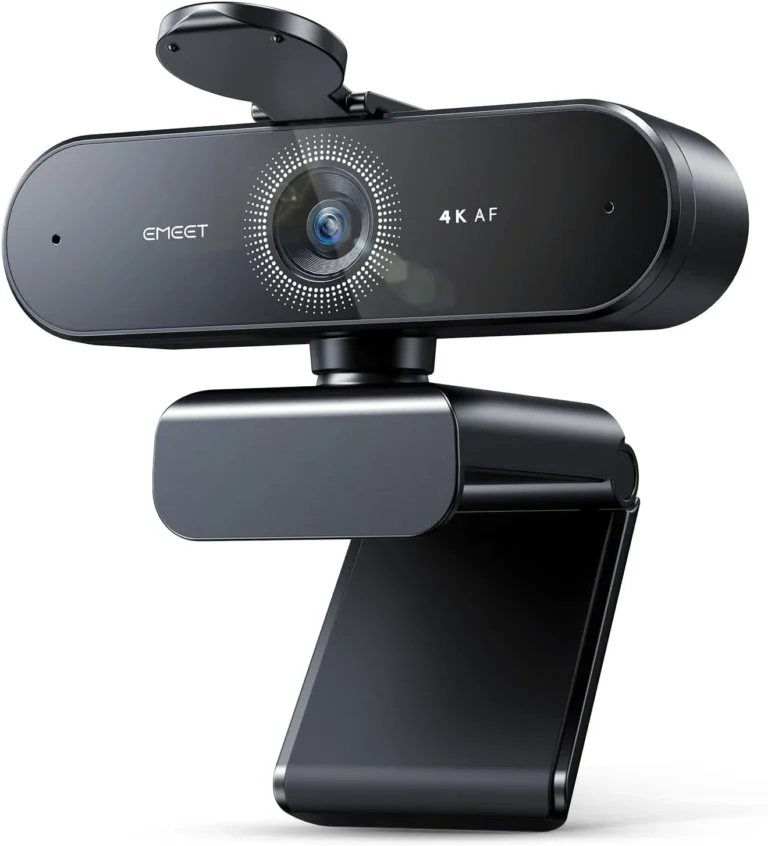
EMEET NOVA 4K Webcam
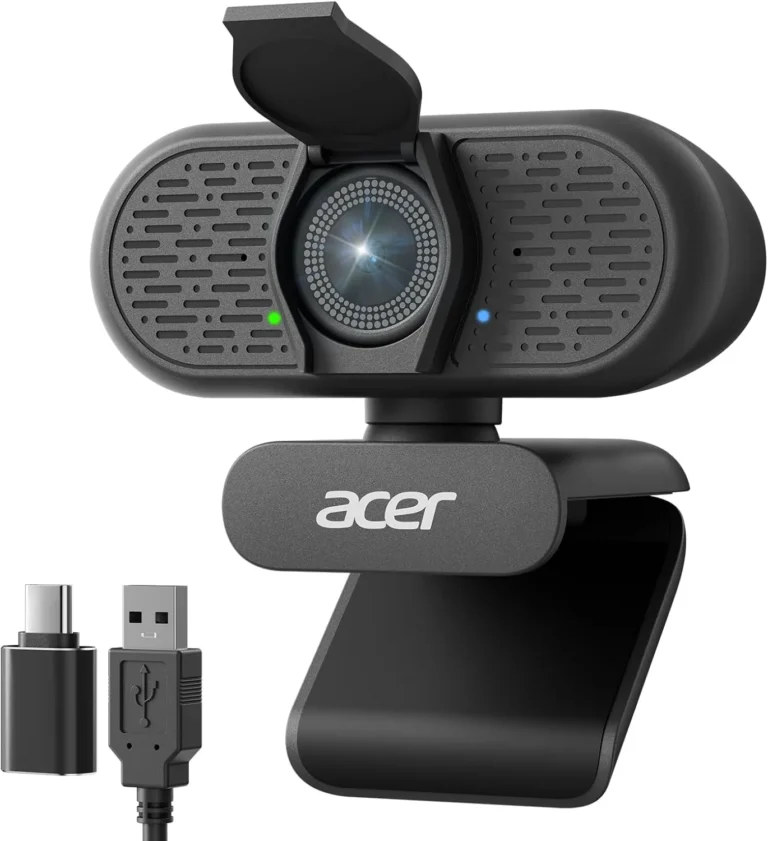
Acer A640 4K Webcam
The NOVA 4K keeps a clear picture at a lamp-lit desk, while the A640's image can turn dark and lose detail once the room dims. In any EMEET NOVA 4K vs Acer A640 choice, though, that gap decides the pair only for a room that stays dim. Most of the other differences lean toward the A640.
The two share a lot of ground. Each pairs a 4K mode at 30 fps with phase-detect focus, and neither needs a driver on Windows or macOS. Both also clip to a monitor and fit a tripod. Given a lit face, either one puts sharp 4K detail on a call.
Past the light, the A640 carries the longer list. Its maker rates its 2K and 1080p modes at 60 fps and credits its mic with AI noise cancellation. A built-in shutter sits in its body, and an adapter in the box fits its USB-A plug to USB-C ports. The NOVA 4K, for its part, brings two omnidirectional mics and a fixed 73-degree frame that keeps one person tight. A stick-on cover that folds over the lens rounds it out.
The scores sit a tenth apart in the full reviews, 8.4 for the NOVA 4K against 8.3 for the A640, so the score alone settles little. The A640 fits a well-lit desk that carries calls and a first stream, while the NOVA 4K fits a single seat in a room that relies on a lamp after dark.
How They Compare
| Category | Winner | Why |
|---|---|---|
| Resolution | Tie | Resolution matches at the top. Both cameras reach 4K and hold it at 30 fps. Each also delivers crisp 4K detail on a call, with natural skin tones on the NOVA 4K and sharp, clean faces on the A640 whenever the room is well lit. The differences sit lower in each range. The NOVA 4K ships set to 1080p, so 4K means a switch in the camera software or in an app such as OBS or PotPlayer. Acer instead lists a 2K mode between 1080p and 4K, a step that also carries its 60 fps rate. At 4K itself the two match, so on resolution alone they are level. |
| Frame rate | Acer A640 4K Webcam | Frame rate separates the two more cleanly than any other line. The A640 runs 4K at 30 fps and 2K or 1080p at 60 fps. A capture app therefore has to ask for 2K or 1080p to reach the faster rate. Acer also aims the camera at streams as much as meetings, naming Twitch alongside Teams and Zoom. The NOVA 4K runs at 30 fps, the rate EMEET gives it, and its listing names no faster mode. A game stream that wants 60 fps motion falls outside its brief. Even so, it still holds its detail on a stream and suits a new channel. On frame rate, the A640 is the stronger camera. |
| Focus | Tie | Focus runs on phase detection in both cameras, and the results match closely. On the NOVA 4K, autofocus settles fast and then stays steady as a face shifts in the chair. EMEET puts its working range at 7.9 to 118 inches, close to 10 feet. The A640 finds a face quickly and follows it as it leans in or sits back, its focus moving to the new distance within a moment. Acer also promises an instant lock. Automatic focus is the only mode on the NOVA 4K, since its listing rules out manual focus and the autofocus has no off switch. Because both settle fast and hold a moving face, focus is level between them. |
| Sensor | EMEET NOVA 4K Webcam | Sensor details run fuller on the A640's sheet, where Acer names a Sony 1/2.8-inch sensor and credits it with clarity and accurate color. The NOVA 4K's listing describes a CMOS sensor. In dim light, the NOVA 4K's image stays clear and usable at a lamp-lit desk without a ring light. The A640's low-light correction keeps a face well exposed in some dark rooms, yet in others its image darkens and gives up detail. Its maker also recommends a well-lit room. Grain does show on some NOVA 4K units, and nothing in Windows or EMEETLINK clears it. Still, judged on that dim-room result rather than the sensor sheet, the NOVA 4K comes out ahead. |
| Microphones | Acer A640 4K Webcam | Microphones take two different approaches here. The NOVA 4K carries two built-in omnidirectional mics, which EMEET rates for clear pickup up to 8 feet. At normal desk distance, a voice comes through them clearly. Its maker's advice, though, is a close seat and a quiet room, and the pair suits calls more than a podcast or a voiceover. The A640 relies instead on a built-in mic with AI noise cancellation. Acer says the AI filters out distracting background noise. In Teams and Zoom, a voice stays clear while noise around the desk stays in the background. Because that filter keeps desk noise back, the A640 has the better microphone here. |
| Connection | Acer A640 4K Webcam | Connection starts from the same USB-A plug on both cameras, and each sets up on Windows or macOS without a driver. The NOVA 4K's fixed 1.5-meter cable ends in a USB 2.0 Type-A plug, the port EMEET specifies. A laptop with only USB-C ports therefore needs an adapter or a hub first. The A640 closes that gap in the box, where an adapter turns its USB-A plug into USB-C. Past the computer, the NOVA 4K's listing also names Android TV 7.0 or later, while the A640's names Nintendo's Switch 2. Call apps such as Zoom and Teams, meanwhile, list either camera as soon as it connects. With the adapter included, the A640 takes this criterion. |
#2 EMEET NOVA 4K Webcam (8.4/10)
In this pair, the NOVA 4K covers the room that stays dim. Under a desk lamp its picture remains clear where the A640's can darken, two omnidirectional mics carry a voice, and a fixed 73-degree frame holds a single seat tight, at 30 fps only.
Strengths
- Keeps a clear, usable picture in dim, lamp-lit rooms
- Sharp 4K detail and natural skin tones on calls and streams
- Two built-in mics carry a voice clearly at normal desk distance
- Phase-detect autofocus settles fast, and the fixed 73-degree view keeps one person framed tight
Weaknesses
- Focus is automatic only, inside a 7.9 to 118 inch range, and video tops out at 30 fps
- EMEETLINK, the app behind the extra image controls, is plain and a little awkward
- Some units fail, either at the first plug-in or after weeks or months on the desk
Review verdict: For one person at a desk on a budget, EMEET's NOVA 4K delivers crisp 4K detail, phase-detect focus that holds through a call and clear desk-distance audio.
- Sharp 4K detail and natural skin tones on calls and streams
- Phase-detect autofocus settles fast and stays steady as you shift in the chair
- Keeps a clear, usable picture in dim, lamp-lit rooms
- Fixed 73-degree view keeps the framing tight on one person at a desk
- Two built-in mics carry a voice clearly at normal desk distance
- Focus is automatic only, inside a 7.9 to 118 inch range, and video tops out at 30 fps
- Grain shows on some units, and no setting in Windows or EMEETLINK removes it
- EMEETLINK, the app behind the extra image controls, is plain and a little awkward
- Some units fail, either at the first plug-in or after weeks or months on the desk
#1 Acer A640 4K Webcam (8.3/10)
Here the A640 is the choice for a lit desk that also streams. It adds 60 fps at 2K and 1080p, a built-in shutter, a mic Acer credits with AI noise cancellation and an in-box USB-C adapter, while in a dim room the NOVA 4K keeps the clearer picture.
Strengths
- Phase-detect autofocus finds a face quickly and follows it as it leans in or sits back
- Crisp, clean 4K detail whenever the room is well lit
- AI noise cancellation keeps a voice clear of background noise on calls
- A built-in shutter, plus an adapter in the box that fits the USB-A plug to USB-C ports
Weaknesses
- Dim rooms can leave the picture dark and short on detail
- Acer itself recommends a well-lit space
- 4K tops out at 30 fps, so 60 fps means dropping to 2K or 1080p
Review verdict: The Acer A640 locks focus fast and renders a crisp 4K picture for budget money, and with decent light it suits calls and starter streams alike.
- Phase-detect autofocus finds a face quickly and follows it as you lean in or sit back
- Crisp, clean 4K detail whenever the room is well lit
- AI noise cancellation keeps a voice clear of background noise on calls
- Driver-free setup on Windows and macOS, with nothing to install
- An adapter in the box fits the USB-A plug to USB-C ports
- Dim rooms can leave the picture dark and short on detail, and Acer itself recommends a well-lit space
- 4K tops out at 30 fps, so 60 fps means dropping to 2K or 1080p
After dark, the NOVA 4K holds the clearer picture
At a lamp-lit desk after dark, the NOVA 4K still produces a clear picture, so a ring light is a nice extra rather than a requirement. Its listing also names automatic light adjustment, and for a backlit face the EMEETLINK app adds backlight compensation beside sliders for brightness, contrast and saturation. The automatic settings suit an ordinary home office, though, so those controls stay optional.
The A640 asks for more help from the room. Acer lists automatic low-light correction and exposure adjustment, and in some dark rooms that correction holds a face at a bright, even exposure. In others, however, the image goes dark and loses its detail, and the listing itself recommends a well-lit room for the best clarity. On an evening desk, that advice means switching on a lamp that faces the chair before the call starts. A small ring light does the same job, while a desk that faces a window gets the light free by day.
Once that light is in place, the gap closes. Both pictures then hold sharp 4K detail, with clean, crisp faces on the A640. A seat that stays dim and lamp-lit, however, still belongs with the NOVA 4K. That makes the room's light, rather than either spec sheet, the first thing to check.
EMEET NOVA 4K vs Acer A640 once the lamp is on
As 4K desk webcams at budget money, the two share a core of 4K at 30 fps and phase-detect focus. Each also sends a sharp image to a call once light reaches the face. The choice then moves to the hardware around that core. There the A640 carries more, from the way it guards the lens to the ports it fits.
On the A640, the shutter sits inside the body and, per Acer, slides shut in an instant, so there is no separate part to fit or lose. The NOVA 4K's cover, by contrast, ships loose, and fitting it to the camera front comes first. Beyond the shutter, the A640 also packs a USB-C adapter, runs 2K and 1080p at 60 fps, and adds a mic that keeps desk noise in the background on calls.
The NOVA 4K's strengths lie elsewhere. Its pair of omnidirectional mics carries a voice at desk distance, while the fixed 73-degree frame keeps the shot tight on one seat. Its clip also swivels 360 degrees on a stand that opens through 180, with 15 degrees of tilt and a 1/4-inch tripod thread underneath. The clip is an unusual design, though it holds firm on a monitor once it sits right. For a lit desk that hosts a stream as well as calls, the A640's extras decide the matter. A single seat in a dim, lamp-lit room, however, still goes to the NOVA 4K.
Conclusion
For a desk where daylight or a lamp reaches the face, the A640 is the better buy. The case is strongest when the desk hosts a stream beside its calls. In that light it matches the NOVA 4K's crisp 4K detail. It then adds 60 fps at 2K and 1080p, a shutter inside the body and a USB-C adapter in the box. Its mic's noise filter also keeps a voice clear on calls. A dim room remains its soft spot, and a desk lamp turned toward the chair is the safe fix.
In a room that stays dim through the evening, the NOVA 4K is the better fit. There the A640's image can darken and lose detail. The NOVA 4K, meanwhile, keeps its picture clear under a desk lamp, with a ring light an extra rather than a need. A tight single-seat frame and two mics for desk-distance calls come with it, too. Choosing it for that steadier evening picture means accepting 30 fps and a stick-on cover.
On the six EMEET NOVA 4K vs Acer A640 criteria, the A640 takes three to the NOVA 4K's one, with two level, and that lead holds wherever light reaches the face.
Frequently Asked Questions
Can the NOVA 4K or the A640 stream 4K at 60 fps?
Neither can. Acer caps the A640's 4K mode at 30 fps and keeps 60 fps for 2K and 1080p, so a 4K stream on it runs at the slower rate. The NOVA 4K stops at 30 fps, the one rate EMEET quotes for it. A stream that needs 4K and 60 fps together therefore fits neither camera, while 60 fps at a lower resolution points to the A640.
Will the NOVA 4K or the A640 plug into a USB-C laptop?
The A640 will, straight from the box, because Acer packs an adapter for USB-C ports. A MacBook or a USB-C-only laptop then needs nothing beyond that adapter. One camera can also move between a work laptop by day and a family desktop in the evening. The NOVA 4K reaches that laptop only through a hub or an adapter, since its fixed cable ends in a Type-A plug.
How does the NOVA 4K's privacy cover compare with the A640's shutter?
The A640's shutter is part of the camera and never leaves it. That suits a camera mounted all day or a child's computer for schoolwork. The NOVA 4K's cover ships loose, and EMEET's FAQ sets out how to fit it: wipe the camera front, peel the backing tape and press the cover on for three seconds. After that, it folds down over the lens between calls, and a blue status light shows whenever an app opens the camera.
Do the NOVA 4K and the A640 need drivers or an app?
Neither camera asks for a driver, and the A640 needs no software at all, by its maker's account. If a call app opens a laptop's own camera first, switching its video source to the A640 fixes that. The NOVA 4K works without EMEETLINK too, though that optional app holds the image sliders and backlight compensation and carries firmware updates. That app runs on 64-bit Windows 10 or later and macOS 10.14 or later, but not on ARM-based Windows.
Does the NOVA 4K or the A640 cope better with a noisy room on calls?
The A640 does, because its maker builds AI noise cancellation into the mic. On calls, a voice then stays clear of desk noise. For the best result, the listing asks for the A640 to be the default input in the sound settings and in Zoom or Teams. EMEET's advice for the NOVA 4K's two mics points the other way: keep them unobstructed, sit close and use a quiet room.